In short
- Xcode can post macOS Notification Center alerts when builds, tests, or archives succeed or fail.
- NotiFerry forwards those macOS alerts to the free ntfy app on your iPhone without custom shell scripts.
- If you prefer a free DIY setup for Xcode alone, Xcode Behaviors can run a one-line curl script that publishes to ntfy.
- For command-line xcodebuild or notarytool runs, chain osascript at the end of the command so the completion alert reaches Notification Center and your phone.
What Xcode already posts to Notification Center
When a clean build, archive, or UI test suite takes several minutes, Xcode posts a macOS notification as soon as the task finishes—at least while Xcode is not the active foreground window, or when configured under Xcode → Settings → Behaviors.
Each alert stays on the Mac. Apple's Continuity features mirror iPhone notifications to a Mac, not Mac notifications to an iPhone. To receive Xcode's completion or failure alert in another room, you can either attach a shell script to Xcode Behaviors or forward macOS Notification Center entries automatically.
Route 1: forward Xcode's macOS notification automatically
If Xcode already shows banners on your Mac, NotiFerry carries them to your iPhone without touching your project files or writing shell scripts:
- In Xcode → Settings → Behaviors, check that Builds → Succeeds, Builds → Fails, Testing → Succeeds, and Testing → Fails have Notify using bezel or system notification enabled.
- Install NotiFerry on your Mac and the free ntfy app on your iPhone, subscribe to your private topic, and confirm the phone test.
- Leave Xcode enabled in NotiFerry's per-app list. Because NotiFerry also covers the rest of your Mac, the same setup forwards alerts from Claude Code, Cursor and Codex, Transporter, and Terminal.
Route 2: run a free ntfy script from Xcode Behaviors
If you only want notifications from Xcode and prefer a free, script-only setup, Xcode Behaviors can run a shell script whenever a build or test run finishes:
- Save this script as
~/bin/xcode-notify.shand make it executable withchmod +x ~/bin/xcode-notify.sh:
#!/bin/sh
curl -s \
  -H "Title: Xcode" \
  -d "Build or test run finished on $(scutil --get ComputerName)" \
https://ntfy.sh/your-private-topic >/dev/null 2>&1- In Xcode → Settings → Behaviors, select Builds → Succeeds (and Fails), check Run, and choose
xcode-notify.sh.
Treat your ntfy topic name like a password: anyone who knows it can read or publish to it. Pick a long random string and do not commit the script with your real topic into a public repository.
Command-line builds with xcodebuild and notarization
Command-line runs such as xcodebuild archive or xcrun notarytool submit --wait do not trigger Xcode GUI Behaviors. Chain osascript at the end of the command so macOS posts a Notification Center alert—and if NotiFerry is running, that alert continues to your iPhone automatically:
xcodebuild -scheme MyApp test && \
  osascript -e 'display notification "Tests passed" with title "xcodebuild"' || \
  osascript -e 'display notification "Tests failed" with title "xcodebuild"'
For more ways to wrap long terminal commands, see getting notified on your iPhone when a Mac task finishes.
See how NotiFerry runs on your Mac
Grant read-only access to the Notification Center folder (no Full Disk Access), subscribe to your private ntfy topic in the free iPhone app, and confirm that a real test arrived to start your 7-day trial.
brew install --cask n2ctech/tap/notiferry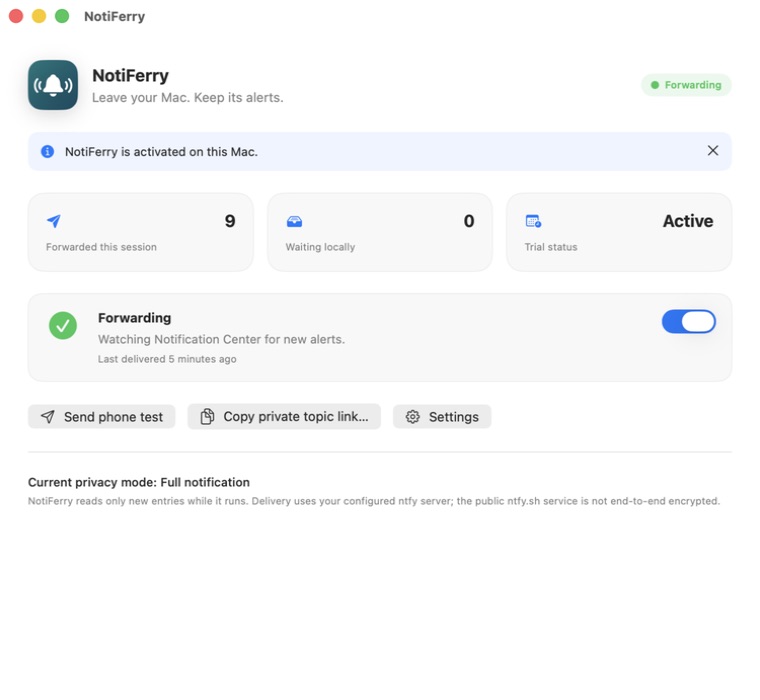
Questions
Why doesn't Xcode post a notification when its window is active?
By default, Xcode shows a small bezel icon instead of a system notification when Xcode is the frontmost app. If you turn on 'Notify using bezel or system notification' in Xcode → Settings → Behaviors and switch to another app or lock the screen when you walk away, macOS posts a normal Notification Center banner.
Can I get Xcode build alerts on my Apple Watch?
Yes. Once the notification arrives in the ntfy app on your iPhone, watchOS mirrors it to your Apple Watch whenever your phone is locked and the watch is unlocked on your wrist.
Does NotiFerry slow down Xcode builds?
No. NotiFerry does not hook into Xcode or inspect your build process. It simply reads new entries that macOS writes to the Notification Center database and publishes them over HTTPS.
What happens if my Mac sleeps during an archive or test run?
A sleeping Mac pauses local builds and cannot forward notifications. Keep your Mac awake while the build or test suite is running.