In short
- Cursor, the Codex Mac app, and Windsurf post macOS Notification Center banners when an agent run finishes or needs approval while the app is unfocused.
- NotiFerry reads new Notification Center entries on your Mac and forwards them to the free ntfy app on your iPhone—no per-editor webhook or plugin required.
- For the terminal Codex CLI, a three-line notify command in ~/.codex/config.toml posts the Mac alert that NotiFerry forwards.
- Title-only mode is on by default so prompt previews and code snippets stay on your Mac.
How Cursor, Codex, and Windsurf notify macOS
Modern AI coding tools run multi-minute refactors, test loops, and terminal commands on your Mac, then pause when they need approval to run a command or when a task completes. Each tool has a way to post a native macOS Notification Center banner when its window is in the background:
- Cursor: Cursor's Agent mode can play a completion sound and post a native macOS system notification when a composer or agent run finishes or awaits a command confirmation while Cursor is unfocused. Make sure system notifications are switched on in Cursor Settings and that Cursor is allowed under System Settings → Notifications.
- Codex Mac app and Codex CLI: The desktop Codex app posts native macOS notifications when a background task completes or waits for approval. If you run the command-line
codexbinary in a terminal, you can configure itsnotifyhook in~/.codex/config.tomlor let a terminal such as Ghostty, Kitty, or iTerm2 emit a desktop notification. - Windsurf: Cascade can trigger a system notification when an action requires user approval or finishes while the editor window is not focused, provided Windsurf has notification permission in macOS System Settings.
Those alerts solve the problem while you are in another window on the same Mac. They do nothing once you leave the desk, because macOS never forwards its Notification Center to an iPhone.
Forwarding editor and agent banners to your iPhone
Instead of configuring a separate webhook or bot for every editor, NotiFerry watches the macOS Notification Center database in a single folder you authorize read-only and publishes new alerts to your private topic in the free ntfy app on your iPhone.
- Verify the Mac banner first. Trigger a short task in Cursor, the Codex app, or Windsurf and switch to another app (such as Finder) so the editor is unfocused. Confirm that a banner appears in the top-right corner of macOS.
- Set up NotiFerry once. Install NotiFerry on the Mac, authorize the
db2folder read-only, scan the QR code in the iPhone ntfy app, and confirm the test alert. - Choose a privacy mode. Title only is the default: your iPhone shows the app name (for example, Cursor or Codex) and the notification title without sending code snippets or prompt previews over the network. Switch to Full notification if you want the full summary line on your lock screen.
Using the Codex CLI in a terminal
If you use the terminal codex CLI rather than the desktop app, you have two ways to get its events onto your phone:
- Post a macOS notification so NotiFerry forwards it: add a
notifycommand to~/.codex/config.tomlthat callsosascript. Run theosascriptcommand once by hand so macOS asks permission for Script Editor under System Settings → Notifications. - Publish directly to ntfy with curl: if you only care about the CLI and do not need alerts from GUI apps like Cursor, Xcode, or Finder, you can invoke
curldirectly in thenotifyarray. See sending a notification from Mac to iPhone for the exactcurlcommand.
# ~/.codex/config.toml
notify = [
  "osascript",
  "-e",
  "display notification \"Codex finished or needs approval\" with title \"Codex\""
]
Why one Mac-level forwarder beats per-tool hooks
| Tool | Native Mac alert | Custom hook support | Forwarded by NotiFerry |
|---|---|---|---|
| Cursor (Agent mode) | Yes, when unfocused | No built-in shell hook for every prompt | Yes |
| Codex Mac app | Yes, for background completions & approvals | Desktop app uses macOS notifications | Yes |
| Codex CLI | Via terminal or config.toml | Yes (notify array in config.toml) | Yes, once it posts to Notification Center |
| Claude Code | In Ghostty, Kitty, iTerm2, or via hook | Yes (Notification hook in settings.json) | Yes |
| Windsurf (Cascade) | Yes, when unfocused | No shell hook required | Yes |
Developers rarely stick to a single tool all week. When you forward at the macOS Notification Center level, switching between Cursor, the Codex app, Claude Code, and Xcode requires zero new webhook configuration—and you can silence noisy apps with one toggle in the NotiFerry menu bar.
See how NotiFerry runs on your Mac
Grant read-only access to the Notification Center folder (no Full Disk Access), subscribe to your private ntfy topic in the free iPhone app, and confirm that a real test arrived to start your 7-day trial.
brew install --cask n2ctech/tap/notiferry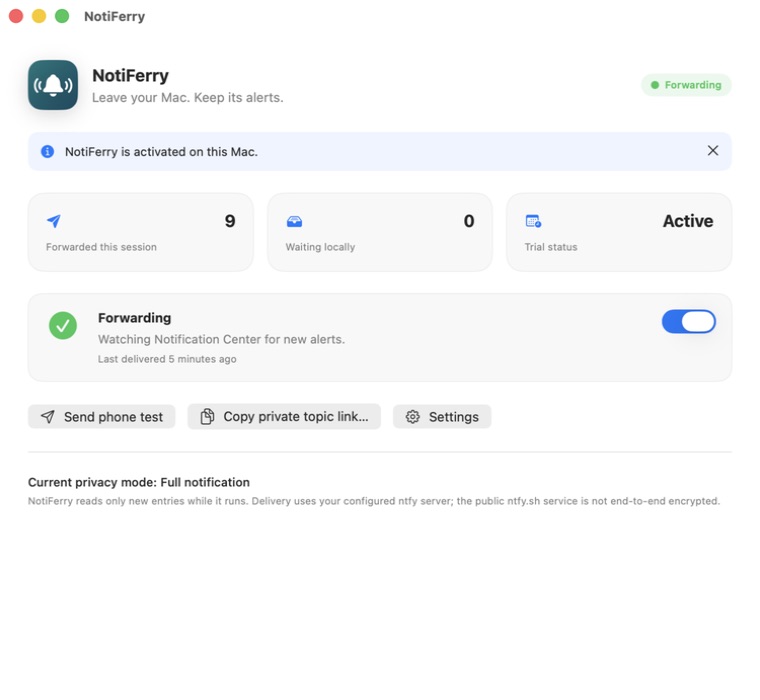
Questions
Why didn't Cursor send a notification while I was looking at the editor?
Cursor and Windsurf normally suppress system notifications while their window is focused in the foreground. Switch to another app or lock the screen when you step away so the editor emits a normal macOS Notification Center alert.
Does NotiFerry read my source code, prompts, or repository?
No. NotiFerry is sandboxed and reads only the macOS Notification Center database folder you authorize read-only. It never accesses your codebase, editor memory, terminal history, or API keys. By default, Title-only mode strips even the notification body before publishing.
Can I get these notifications on my Apple Watch too?
Yes. Once the alert arrives in the ntfy app on your iPhone, watchOS mirrors it to your Apple Watch automatically whenever your iPhone is locked and your watch is on your wrist.
Does the Mac need to stay awake while Cursor or Codex works?
Yes. Both the local agent task and NotiFerry run on your Mac. If the Mac goes to sleep, the agent pauses and no notifications are sent until the Mac wakes.
Is NotiFerry affiliated with Cursor, Codex, or Windsurf?
No. NotiFerry is an independent macOS utility. It works with those editors because they post standard notifications to macOS Notification Center.