In short
- The iOS ntfy app works on Apple Watch through standard iOS notification mirroring—no separate watchOS app is needed.
- Turn on ntfy under Watch app → Notifications → Mirror iPhone Alerts From, and test while your iPhone screen is locked.
- Use curl for alerts from your own shell scripts, or NotiFerry to forward macOS Notification Center alerts from any Mac app to ntfy.
- If your Mac uses a Focus mode that syncs across iCloud, add ntfy to the allowed apps so your watch is not silenced while you work.
Does ntfy have an Apple Watch app?
No standalone watchOS app is required. Even though the ntfy iOS app does not install a separate complication or watchOS binary, every push notification that arrives in ntfy on your iPhone is automatically eligible for Apple Watch notification mirroring.
When a message is published to your ntfy topic—whether from a curl script or from NotiFerry forwarding your Mac's Notification Center—APNs wakes the ntfy app on your iPhone, and iOS forwards the banner to your wrist whenever your iPhone screen is locked.
How to make sure ntfy taps your wrist
- On your iPhone, open the Watch app and tap My Watch → Notifications.
- Scroll down to Mirror iPhone Alerts From, find ntfy, and verify its switch is green.
- Check your Focus settings. On macOS and iOS, Focus modes sync across devices by default. If you turn on a Work or Do Not Disturb Focus on your Mac, your iPhone and Apple Watch enter that Focus too—and silence ntfy unless you add ntfy to the Focus mode's allowed apps.
- Lock your iPhone before testing. Apple routes a notification to either the active iPhone screen or the Apple Watch, never both at once. If you test while looking at your unlocked phone, the watch stays silent by design.
Two ways to send Mac alerts to your watch via ntfy
Once ntfy is mirrored to your watch, you can feed it from your Mac in two ways:
- From your own scripts and cron jobs (free): run a one-line
curlcommand at the end of a script or build:
curl -s \
  -H "Title: Backup complete" \
  -H "Priority: default" \
  -d "Time Machine finished on Mac Studio" \
https://ntfy.sh/your-private-topic- From any Mac app that posts to Notification Center (no scripts): NotiFerry watches for new macOS Notification Center entries from Xcode, Claude Code, Cursor, Finder, or backup tools and publishes them to your ntfy topic automatically.
On a small watch screen, NotiFerry's default Title only mode is particularly clean: you see the Mac app name and the notification headline on your wrist without exposing message bodies to people nearby.
What you can and cannot do from the wrist
| Feature | Behavior on Apple Watch |
|---|---|
| Haptic tap & chime | Supported via standard watchOS mirroring |
| App name, title, and body | Displayed on the wrist; controlled by your script or NotiFerry privacy mode |
| Dismissing the alert | Supported on the watch |
| Replying or clicking Mac buttons | Not supported; the watch cannot click buttons on the Mac |
| Standalone cellular without iPhone online | Requires the paired iPhone to be online to receive third-party push alerts |
See how NotiFerry runs on your Mac
Grant read-only access to the Notification Center folder (no Full Disk Access), subscribe to your private ntfy topic in the free iPhone app, and confirm that a real test arrived to start your 7-day trial.
brew install --cask n2ctech/tap/notiferry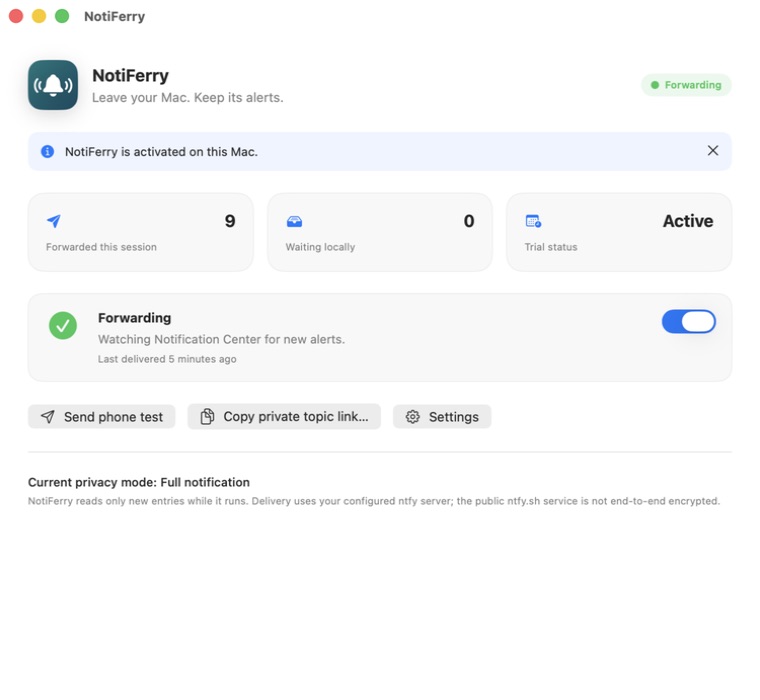
Questions
Why do ntfy notifications show up on my iPhone lock screen but not on my Apple Watch?
Check three things: (1) the iPhone screen must be locked, because iOS does not buzz the watch while the phone is unlocked; (2) ntfy must be enabled under Watch app → Notifications → Mirror iPhone Alerts From; and (3) your Apple Watch must be unlocked on your wrist and not in a Focus mode that blocks ntfy.
Does ntfy on iOS deliver push notifications in the background?
Yes, when using ntfy.sh or a self-hosted ntfy server configured with upstream-base-url = "https://ntfy.sh" so Firebase and APNs wake the iOS app.
Can I use a self-hosted ntfy server with Apple Watch?
Yes. As long as your self-hosted ntfy server forwards push notifications to the official iOS ntfy app (via upstream-base-url) and uses HTTPS, iOS mirrors those notifications to your Apple Watch just like ntfy.sh.
Does NotiFerry require a separate Apple Watch app?
No. NotiFerry runs on your Mac and publishes to your ntfy topic. The free ntfy app on your iPhone receives the push notification, and watchOS mirrors it to your wrist.