In short
- Both Pushover and ntfy receive HTTPS requests and deliver iOS push notifications, but neither forwards macOS Notification Center on its own.
- ntfy is free, open source, requires no account on ntfy.sh, and can be self-hosted; Pushover is a polished $5 one-time iOS app with token-authenticated APIs and 10,000 messages/month.
- For your own scripts, both need only a single curl command.
- To forward alerts from Mac apps you cannot script without granting Full Disk Access, NotiFerry pairs with ntfy (on ntfy.sh or your own server).
What Pushover and ntfy have in common
Both Pushover and ntfy are HTTP-to-push receivers: you make an HTTPS POST request from a computer or server, and their iOS app displays a push notification on your iPhone (and mirrors it to your Apple Watch).
Neither service forwards macOS Notification Center by itself. As Pushover's support documentation explains, it only delivers messages sent to its API; it does not read the notifications that other apps post on your Mac. The same is true of ntfy on its own. Something on the Mac has to publish the message: either a script you write or a macOS forwarder such as NotiFerry or AhPushIt.
Pushover vs ntfy side by side
| Feature | ntfy | Pushover |
|---|---|---|
| Account required | No account required on ntfy.sh (subscribe to a topic name) | Yes (account + user key + application API token) |
| Price for the receiver | Free iOS app and free public ntfy.sh tier (paid tiers for higher limits) | $5 one-time per platform (iOS, Android, Desktop) after a 30-day trial |
| Open source & self-hostable | Yes (Apache 2.0 / GPLv2; self-hostable on your own HTTPS server) | No (proprietary hosted service) |
| Public tier message limit | 250 messages per day per IP on free ntfy.sh; messages cached ~12 hours | 10,000 messages per month per application token |
| Critical / bypass silent mode alerts | Supported via Priority 5 (max/urgent) headers | Supported via Emergency Priority (repeats until acknowledged) |
| Forwards macOS Notification Center | With NotiFerry (sandboxed, read-only folder access) or AhPushIt (Full Disk Access) | With AhPushIt (Full Disk Access); not supported by NotiFerry |
Sending from a Mac script: curl syntax compared
For your own terminal scripts, cron jobs, or Claude Code hooks, ntfy takes one line and requires no registration:
curl -d "Build finished" https://ntfy.sh/your-private-topicPushover requires creating an account, copying your User Key, and registering an Application API Token, then passing both in the form payload:
curl -s \
  --form-string "token=YOUR_APP_TOKEN" \
  --form-string "user=YOUR_USER_KEY" \
  --form-string "message=Build finished" \
  https://api.pushover.net/1/messages.json
The trade-off is access control: on public ntfy.sh, the topic name itself is the secret unless you use a paid account with access tokens or run your own ntfy server. With Pushover, every request is authenticated by your token and user key out of the box.
What if you want notifications from Mac apps you cannot script?
Shell commands work well for scripts you control, but they do not help when a closed-source Mac app—Finder, Xcode, Cursor, the Codex Mac app, or a backup utility—posts a banner to macOS Notification Center.
- With ntfy + NotiFerry: NotiFerry is a sandboxed macOS menu-bar app that reads new entries from the Notification Center database folder you authorize read-only (no Full Disk Access), applies your privacy mode (full text, title only, or generic alert), and publishes to your ntfy topic on
ntfy.shor your own HTTPS server. It costs €9.99 once for up to 2 Macs after a 7-day trial. - With Pushover + AhPushIt: if you already use Pushover and are comfortable granting Full Disk Access on your Mac, the open-source app AhPushIt can forward Notification Center entries to Pushover as well as ntfy. See Mac-to-iPhone notification apps compared for the full breakdown.
See how NotiFerry runs on your Mac
Grant read-only access to the Notification Center folder (no Full Disk Access), subscribe to your private ntfy topic in the free iPhone app, and confirm that a real test arrived to start your 7-day trial.
brew install --cask n2ctech/tap/notiferry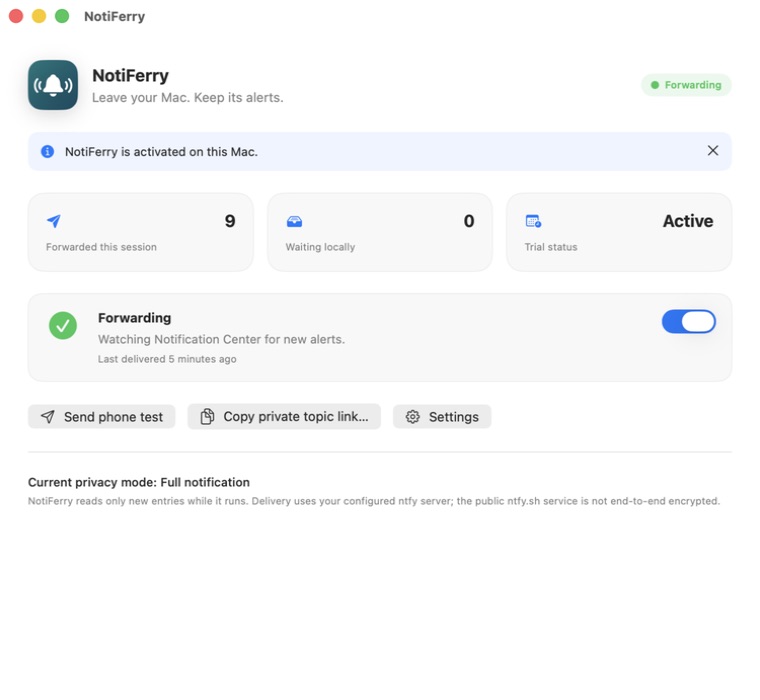
Questions
Can Pushover forward macOS notifications to my iPhone by itself?
No. Pushover's own documentation states that it does not forward notifications from a Mac or PC to a phone. It delivers messages sent to its HTTP API by a script or third-party forwarder.
Why does NotiFerry use ntfy instead of Pushover?
ntfy lets you receive test and forwarded notifications immediately in a free iPhone app without creating an account or copying API keys, and it allows privacy-conscious users to point NotiFerry at their own self-hosted HTTPS ntfy server.
When is Pushover a better choice than ntfy?
Pushover is a strong fit when you only send alerts from your own scripts, want authenticated API tokens without self-hosting, need up to 10,000 messages per month per app, or rely on Pushover's repeating emergency-priority acknowledgements.
Are ntfy or Pushover end-to-end encrypted?
Neither public ntfy.sh nor Pushover is end-to-end encrypted by default; both use HTTPS in transit and process message text on their servers to deliver APNs push notifications. With NotiFerry, Title-only and Generic modes let you keep notification body text on your Mac.