In short
- macOS stores active Notification Center alerts in ~/Library/Group Containers/group.com.apple.usernoted/db2/db using SQLite WAL mode.
- Each row in the record table links an app bundle identifier to a Core Data timestamp and a binary plist containing the title, subtitle, and body.
- Because WAL mode uses db-wal alongside db, readers need read-only access to the db2 folder—not just the db file.
- NotiFerry runs in the App Sandbox and uses a read-only folder bookmark to db2 instead of requesting Full Disk Access.
Why macOS has no public cross-app notification API
Developers looking to automate or forward macOS notifications quickly discover a platform gap: Apple's UNUserNotificationCenter framework only lets an app schedule and inspect its own notifications, scoped to its bundle identifier. Unlike Android's NotificationListenerService, macOS provides no public entitlement or observer API for a third-party utility to subscribe to banners posted by other apps.
Instead, the per-user system daemon usernoted receives notification requests from apps across the Mac and persists active Notification Center entries in a local SQLite database inside the user's home directory:
# Per-user Notification Center database directory on macOS 15 Sequoia
~/Library/Group Containers/group.com.apple.usernoted/db2/

# Files inside db2/
db        # Main SQLite 3 database
db-wal    # Write-Ahead Log containing recent uncommitted/checkpointed frames
db-shm    # Shared-memory index for WAL readers
Inside the usernoted db2 SQLite schema
Because usernoted opens the database in SQLite Write-Ahead Logging (WAL) mode, newly delivered banners live in db-wal until a checkpoint flushes them into db. Any tool that reads the database must therefore have read access to the entire db2 directory (not only the db file) so SQLite can see both db and db-wal.
Two tables hold the information a notification forwarder needs:
app: maps an integerapp_idto the sending application's bundle identifier (identifier, such ascom.apple.dt.Xcodeorcom.todesktop.230313mzl4w4u92).record: stores each notification row with a monotonically increasingrec_id, foreign keyapp_id,delivered_date(seconds since Apple's Core Data reference date of2001-01-01 00:00:00 UTC, which is978307200seconds after the Unix epoch), and a binary property list (bplist00) blob indatacontaining the notification'sreq.titl(title),req.subt(subtitle), andreq.body(body).
# Read-only inspection of recent notification records (macOS 15)
sqlite3 -readonly \
  "$HOME/Library/Group Containers/group.com.apple.usernoted/db2/db" \
  "SELECT r.rec_id, a.identifier, datetime(r.delivered_date + 978307200, 'unixepoch') AS delivered_utc, length(r.data) AS bytes FROM record r JOIN app a ON r.app_id = a.app_id ORDER BY r.rec_id DESC LIMIT 5;"
Security: single-folder read-only access vs Full Disk Access
On modern macOS, ~/Library/Group Containers/group.com.apple.usernoted is protected by Transparency, Consent, and Control (TCC). Utilities that read this database take one of two security approaches:
| Access model | What the user grants | Blast radius |
|---|---|---|
| Full Disk Access (TCC) | System Settings → Privacy & Security → Full Disk Access | App can read Mail, Messages, Safari history, SSH keys, and every file on the Mac |
| App Sandbox + security-scoped folder bookmark (NotiFerry) | Select the db2 folder once in a standard macOS Open dialog | Read-only access to that single db2 folder; no access to the rest of your disk |
NotiFerry runs inside the macOS App Sandbox and uses a read-only security-scoped bookmark to db2. It never asks for Full Disk Access or Accessibility permissions, opens the SQLite database in read-only mode so it never locks or mutates usernoted state, and resolves bundle identifiers to the friendly application names Finder displays.
Real-world edge cases when polling usernoted
If you build or choose a tool that reads usernoted, watch out for three practical quirks on macOS 15:
- Future timestamps in
delivered_date: scheduled or calendar-adjacent system notifications can occasionally appear inrecordwith a timestamp hours in the future. A naive high-water mark ondelivered_datewill stall all subsequent forwarding until wall-clock time catches up. NotiFerry filters out future-dated rows and repairs invalid cursors automatically. - Paused-window floods: if you pause forwarding for a meeting, you do not want 40 stale banners dumped onto your iPhone when you resume. NotiFerry advances its cursor across paused intervals so only fresh notifications after resuming are sent.
- Sensitive message bodies: notification bodies often contain 2FA codes, private messages, or customer data. NotiFerry defaults to Title only (or Generic alert) and lets you disable individual apps with one click in the menu bar.
See how NotiFerry runs on your Mac
Grant read-only access to the Notification Center folder (no Full Disk Access), subscribe to your private ntfy topic in the free iPhone app, and confirm that a real test arrived to start your 7-day trial.
brew install --cask n2ctech/tap/notiferry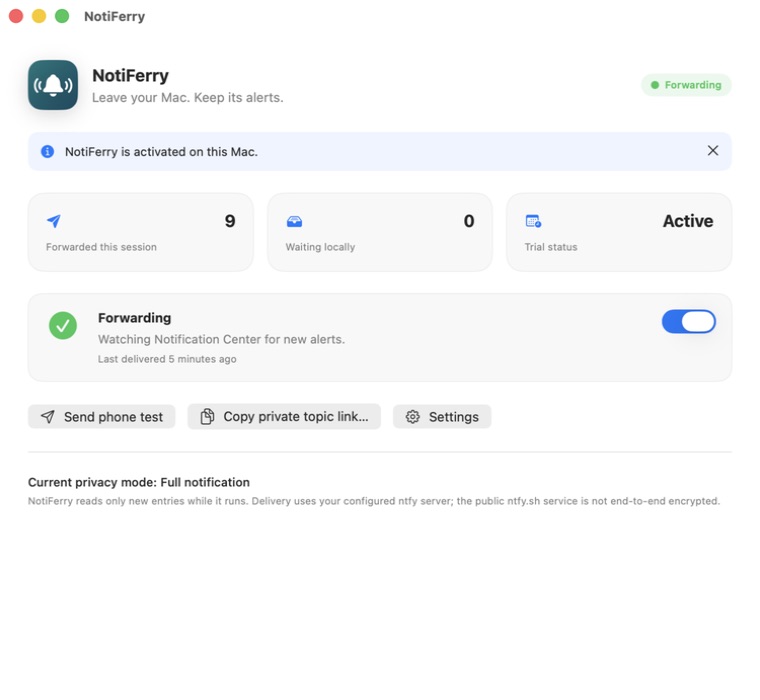
Questions
Can reading the usernoted SQLite database corrupt Notification Center?
Not when opened with SQLite's read-only flag (SQLITE_OPEN_READONLY). In WAL mode, SQLite supports concurrent read-only readers alongside usernoted without blocking deliveries or modifying the database files.
Does the usernoted database store notifications after I dismiss them?
usernoted keeps active Notification Center entries in record and prunes rows as banners expire or are cleared from Notification Center. Ephemeral banners that are configured as None in System Settings → Notifications may not be written to record.
Why does Apple not document group.com.apple.usernoted?
group.com.apple.usernoted is an internal macOS storage container for the Notification Center daemon. Because it is undocumented, its schema can change in a future macOS release, which is why any Notification Center forwarder is best-effort.
How do I forward new usernoted records to my iPhone without writing a script?
Install NotiFerry on your Mac and the free ntfy app on your iPhone. Authorize the db2 folder read-only once, scan the topic QR code, and confirm the test alert.