In short
- terminal-notifier and osascript post alerts to the local macOS Notification Center; macOS never forwards them to an iPhone.
- For a single shell script you edit yourself, adding curl -d "..." https://ntfy.sh/your-topic sends a free push to the ntfy iPhone app.
- To forward existing terminal-notifier calls, osascript hooks, and GUI Mac apps without editing scripts, run NotiFerry on the Mac.
- NotiFerry reads the Notification Center folder read-only (no Full Disk Access) and supports Title-only, Full, and Generic privacy modes.
What terminal-notifier and osascript do on macOS
terminal-notifier is a popular macOS command-line tool (installed via brew install terminal-notifier) that posts native banners to the macOS Notification Center from shell scripts, Makefiles, launchd agents, and CI hooks. macOS also ships a built-in AppleScript command, osascript -e 'display notification ...', that posts to the same Notification Center without installing any package:
# Existing local macOS banner with terminal-notifier
brew install terminal-notifier
terminal-notifier -title "Deploy" -message "Production build finished"

# Native built-in AppleScript alternative (no Homebrew package needed)
osascript -e 'display notification "Production build finished" with title "Deploy"'
Both commands deliver alerts to macOS Notification Center on the Mac screen. Neither one sends anything to an iPhone—because macOS only mirrors notifications from iPhone to Mac, never from Mac to iPhone.
Option 1: Add curl + ntfy to the scripts you control
If you are editing your own shell function or .zshrc helper and only want that specific command to reach your phone, you can call the free ntfy service directly next to terminal-notifier:
# ~/.zshrc — post a local macOS banner AND push to iPhone via ntfy
notify_phone() {
  local title="${1:-Mac Task}"
  local body="${2:-Command finished}"
  terminal-notifier -title "$title" -message "$body"
  curl -s -H "Title: $title" -d "$body" https://ntfy.sh/your-long-private-topic >/dev/null
}
With the free ntfy app installed on your iPhone and subscribed to your-long-private-topic, calling notify_phone "Tests" "All passed" shows both a desktop banner on the Mac and a push notification on your iPhone. See sending a notification from Mac to iPhone for more one-line shell examples.
Option 2: Forward terminal-notifier and all Mac banners automatically
Many tools already invoke terminal-notifier, osascript, or the native macOS UNUserNotificationCenter API under the hood—including third-party CLI tools, Homebrew plugins, Claude Code, Cursor and Codex, Xcode, and terminal emulators like Ghostty, Kitty, and iTerm2. Editing every tool's script or hook file to add a curl call is fragile.
NotiFerry takes the Mac-level approach: it watches the macOS Notification Center database read-only and forwards new alerts from terminal-notifier, Script Editor, your terminal emulator, and any other enabled Mac app straight to your iPhone's ntfy topic.
- Zero script rewrites: existing
terminal-notifiercalls in Makefiles,package.jsonscripts, andlaunchdjobs immediately reach your iPhone. - Per-app toggles: leave
terminal-notifier, Ghostty, and Xcode enabled while muting chat or mail apps from the menu bar. - Privacy modes: keep Title only enabled so command arguments or file paths in the notification body stay on your Mac, or switch to Full notification when you want the complete message on your lock screen.
Comparing terminal-notifier + curl vs NotiFerry
| Approach | Covers custom shell scripts | Covers existing tools & GUI apps | Per-script changes needed |
|---|---|---|---|
| terminal-notifier alone | Mac screen only | No | None (stays on Mac) |
| curl to ntfy.sh | Yes (iPhone & Watch) | No (only scripts you edit) | Add curl + topic URL to each script |
| terminal-notifier + NotiFerry | Yes (Mac + iPhone + Watch) | Yes (all Notification Center apps) | None—forwards existing Mac banners |
See how NotiFerry runs on your Mac
Grant read-only access to the Notification Center folder (no Full Disk Access), subscribe to your private ntfy topic in the free iPhone app, and confirm that a real test arrived to start your 7-day trial.
brew install --cask n2ctech/tap/notiferry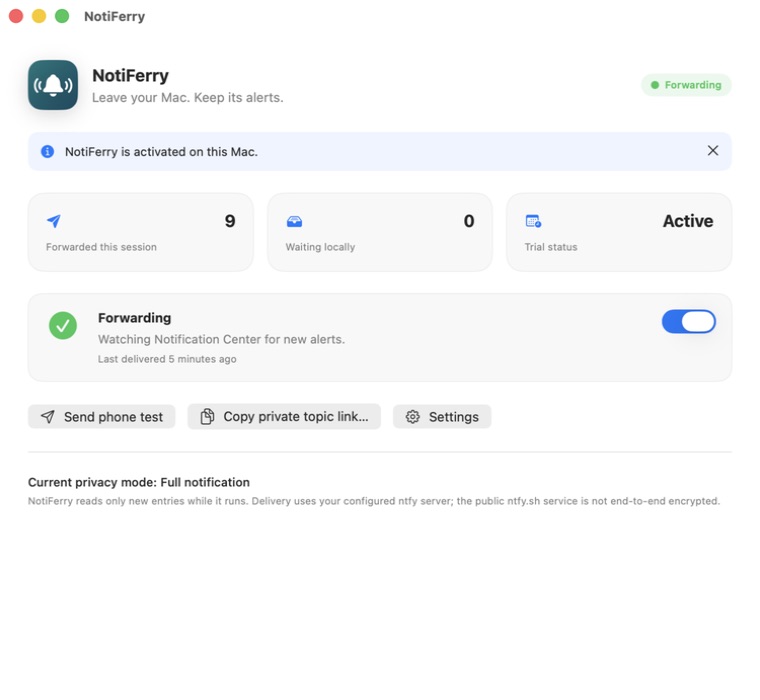
Questions
Why does terminal-notifier run without error in Terminal, but no banner appears on macOS?
Check System Settings → Notifications → terminal-notifier on your Mac and make sure Allow Notifications is enabled and the alert style is set to Banners or Alerts. Also note that terminal-notifier suppresses the banner if the application set in -activate or -sender is currently frontmost.
How does NotiFerry label alerts posted by terminal-notifier or osascript?
NotiFerry uses the display name of the sending bundle recorded by macOS Notification Center—so alerts from terminal-notifier appear under terminal-notifier, and alerts from osascript appear under Script Editor.
Do I still need terminal-notifier on macOS 15 Sequoia?
For simple title-and-message alerts, macOS's built-in osascript -e 'display notification "..." with title "..."' requires no third-party binary. terminal-notifier remains useful when you want a custom sender icon or click action on the Mac.
Can I use a self-hosted ntfy server instead of ntfy.sh?
Yes. Both curl and NotiFerry support any self-hosted ntfy server over HTTPS, including Bearer token or basic authentication.